It’s Tuesday afternoon. You meant to post on Instagram this morning, your LinkedIn page hasn’t been touched in three weeks, and a customer comment on Facebook has been sitting unanswered since the weekend. You’re not lazy. You’re running a business, and social media is one of fifteen jobs competing for the same hour.
This is exactly the problem social media management tools solve. Instead of logging into every platform one by one, you plan, schedule, publish, and measure from a single dashboard. Done well, one weekly session replaces daily scrambling. Done badly, you pay $100 a month for software that mostly sits unused.
The trouble is that the market is crowded and the pricing is confusing. Some tools charge per social account, some per user, and some per “brand.” A tool that costs $15 a month for one person can cost $400 a month for a five-person team. This guide compares five of the most relevant options for small businesses, shows what they really cost, and helps you choose without burning through a free trial.
Before you pick software, make sure you know what you’re posting and why. If you haven’t built that plan yet, start with our guide on building a content marketing strategy that generates leads and the broader digital marketing guide for small businesses. And if you’d rather hand the whole job to specialists, take a look at our social media marketing service.
Quick Answer
The best social media management tool depends on your team size and budget. A solo owner posting to a few accounts should start with Buffer’s free plan or Metricool’s free plan. A visual, Instagram-first or TikTok-first brand will feel at home in Later. A small team that needs approvals should look at Buffer’s Team plan or Metricool Advanced. Larger teams that need deep reporting and social listening are the audience for Sprout Social and Hootsuite, but both charge per user, so costs climb fast. The guiding principle is simple: pay for the accounts and people you actually have, not for features you will never open.
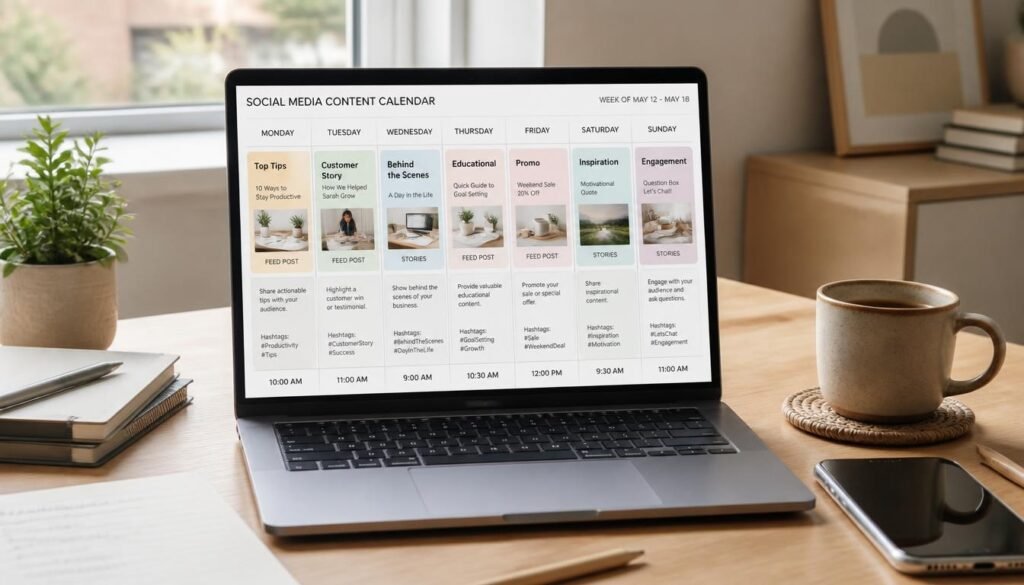
Table of Contents
- What Are Social Media Management Tools?
- How to Choose the Right Social Media Management Tool
- Best Social Media Management Tools Available
- Comparison Table
- Best Social Media Management Tools for Different Businesses
- How to Set Up and Use a Social Media Management Tool
- Common Mistakes
- Expert Tips
- Final Verdict
- Frequently Asked Questions
What Are Social Media Management Tools?
Social media management tools are software platforms that let you handle several social networks from one place. At minimum, they let you write a post once and schedule it to Facebook, Instagram, LinkedIn, TikTok, X, Pinterest, and other channels at the times you choose. Most also add a content calendar, analytics, a shared inbox for comments and messages, and AI helpers for captions and ideas.
You may also see them called social media scheduling tools or social media management software. The labels overlap, but there is a real difference in depth. A pure scheduler focuses on publishing. A full management platform adds engagement, reporting, approvals, and sometimes social listening, which means tracking mentions of your brand across the web.
Why does this matter for a small business? Consistency. Algorithms reward accounts that show up regularly, and customers trust brands that look active. The right tool lets you batch a week of content in one sitting, so posting doesn’t depend on your mood or your calendar.
Social media also works best when it supports your other channels. A strong post can send people to your email list, and for local businesses it reinforces what you’re already doing to get more customers from Google Maps. A management tool simply makes that effort repeatable.
How to Choose the Right Social Media Management Tool
Before comparing features, answer three questions. They eliminate most of the options in under five minutes.
1. How many accounts and how many people? Pricing models depend on this. Per-channel pricing (Buffer) favors people with few accounts. Per-user pricing (Hootsuite, Sprout Social) favors single operators and punishes growing teams. Per-brand or per-set pricing (Metricool, Later) sits somewhere between the two.
2. Which platforms matter most? If your customers live on LinkedIn, check that the tool’s free or entry plan actually includes it, because some plans exclude LinkedIn or X. If you’re visual-first, you’ll want a strong Instagram and TikTok planner.
3. What do you need beyond scheduling? Be honest. Most small businesses need a calendar, basic analytics, and a way to reply to comments. Social listening, competitor benchmarking, and custom reports are nice, but they’re rarely worth $200 a month for a team of two.
For a neutral starting point on planning your marketing, the U.S. Small Business Administration publishes free guidance on how to market your business. It’s also worth listing the free tools you already use. Several of the Google tools we recommend can cover analytics gaps while you start on a lighter plan.
Best Social Media Management Tools Available
The five tools below were chosen for small-business fit, clear pricing, and range: one budget scheduler, one analytics-friendly all-rounder, one visual specialist, and two team-grade platforms. Pricing reflects published plans checked in November 2026 and changes often, so confirm on each vendor’s page before you buy.
Buffer
Overview: Buffer is one of the simplest schedulers on the market and one of the few with a genuinely usable free plan. It bills per connected channel rather than per user, which keeps costs predictable if you manage a handful of accounts. The interface is clean, the learning curve is short, and you can be scheduling posts within minutes of signing up.
Key Features:
- Free plan with up to 3 channels and a limited number of scheduled posts per channel
- Visual queue and content calendar
- AI-assisted caption suggestions and an ideas inbox
- Analytics on paid plans, plus engagement tools
- Team plan adds unlimited users and approval workflows
Best For: Solo owners, freelancers, and small businesses with three to ten accounts.
Pros:
- ✅ Real free plan to test with
- ✅ Simple, fast interface
- ✅ Per-channel pricing is easy to forecast (about $5 per channel monthly on annual billing for Essentials, and about $6 month to month)
Cons:
- ❌ Essentials includes only one user, so collaboration means upgrading to Team (about $10 per channel on annual billing)
- ❌ Costs rise with every added channel
Our Verdict: Buffer is the safest starting point for most small businesses. Begin on the free plan, upgrade only when you outgrow three channels or need a teammate. If your posts point to your own site, make sure that site is ready; our guide to the best website builders for small business can help.
Metricool
Overview: Metricool combines scheduling with unusually strong analytics for the price. It prices by the number of “brands” (sets of connected accounts), which suits freelancers and small agencies managing several clients. It also includes a free plan, though that plan leaves out LinkedIn and X.
Key Features:
- Free plan for one brand
- Content planner across major networks
- Analytics dashboards and reports
- Starter plan covers up to 5 brands; Advanced adds approvals and deeper features
- X (formerly Twitter) is available as a paid add-on
Best For: Budget-conscious businesses that care about reporting, and anyone managing multiple brands.
Pros:
- ✅ Free forever plan for one brand
- ✅ Paid plans start around $20 a month on annual billing for up to five brands
- ✅ Strong analytics for the money
Cons:
- ❌ Free plan excludes LinkedIn and X
- ❌ Approval workflows require the Advanced tier
Our Verdict: If reporting matters to you or you manage more than one brand, Metricool offers the best value on this list. Pair its reports with Google’s free analytics and you’ll have a full picture of what social media is doing for your business.
Later
Overview: Later grew up as an Instagram planner and still shines for visual content. Its drag-and-drop calendar lets you see your grid before you publish, which is a real advantage for brands where aesthetics drive sales. It no longer offers a free plan, so you’re paying from day one after the trial.
Key Features:
- Visual content calendar and media library
- Link-in-bio tools
- Best-time-to-post suggestions
- Plans built around “social sets” (a group of profiles, one per platform)
- Higher tiers add more sets, users, and collaboration features
Best For: Instagram-first and TikTok-first brands, creators, boutiques, and food and lifestyle businesses.
Pros:
- ✅ Excellent visual planning
- ✅ Entry plan costs roughly $25 a month on monthly billing, less on annual
- ✅ Link-in-bio support built in
Cons:
- ❌ No permanent free plan
- ❌ The entry tier is limited to one user and a monthly cap on posts per profile
Our Verdict: Choose Later if your brand lives or dies by how it looks. Pair your link-in-bio with a focused page, and our guide to landing pages that convert visitors into leads shows how to make those clicks count.
Hootsuite
Overview: Hootsuite is one of the longest-running names in the category. It’s a broad platform covering publishing, a unified inbox, analytics, and competitor benchmarking. The catch is the pricing: it’s per user, with no free plan, so even a solo owner starts around $99 a month on annual billing.
Key Features:
- Scheduling and bulk publishing across major networks
- Unified inbox for comments and messages
- Analytics and reporting, with more depth on higher tiers
- Standard, Professional, and Advanced tiers (roughly $99, $199, and $399 per user monthly on annual billing)
- Approval workflows on the top self-serve tier
Best For: Established teams that need breadth and are comfortable paying per seat.
Pros:
- ✅ Mature feature set and broad network support
- ✅ Good fit when several departments touch social
- ✅ Established training and certification resources
Cons:
- ❌ Expensive for small teams, since every extra user adds to the bill
- ❌ No free plan, and monthly billing costs noticeably more than annual
Our Verdict: Hootsuite makes sense once social media is a department, not a side task. Until then, it’s hard to justify. If you do adopt it, put a workflow in place first; our best project management software for small businesses can help you manage the approval pipeline around it.
Sprout Social
Overview: Sprout Social is the premium option, known for polished reporting, a smart inbox, and social listening add-ons. Pricing is per seat, with entry-level Essentials around $79 and Standard around $199 per seat monthly on annual billing. Lower tiers also cap the number of social profiles at five, so growing brands hit limits quickly.
Key Features:
- Publishing, calendar, and a unified smart inbox
- Detailed analytics and customizable reports
- Social listening and employee advocacy as add-ons on higher tiers
- Essentials, Standard, Professional (unlimited profiles), and Advanced tiers
- Approval workflows and automation on top tiers
Best For: Mid-sized businesses and agencies that need reporting depth and have the budget for it.
Pros:
- ✅ Best-in-class reporting and inbox experience
- ✅ Strong collaboration tools on higher plans
- ✅ Reliable and well supported
Cons:
- ❌ Per-seat pricing escalates rapidly (a five-person team on Professional runs well over $1,000 a month)
- ❌ Profile caps on lower plans, and key features locked behind add-ons
Our Verdict: Sprout Social is excellent software that most small businesses don’t need yet. Before you commit that kind of budget, review the 25 digital marketing mistakes costing you customers to make sure the basics are solid.

Comparison Table
| Tool | Best For | Starting Price | Pricing Model | Free Plan | Approval Workflows |
|---|---|---|---|---|---|
| Buffer | Solo owners, small teams | About $5 per channel/month (annual) | Per channel | Yes (3 channels) | Team plan |
| Metricool | Analytics on a budget, multi-brand | About $20/month (annual, 5 brands) | Per brand tier | Yes (1 brand) | Advanced plan |
| Later | Visual, Instagram-first brands | About $25/month (monthly) | Per social set | No | Higher tiers |
| Hootsuite | Established teams | About $99 per user/month (annual) | Per user | No | Advanced tier |
| Sprout Social | Reporting-heavy teams | About $79 per seat/month (annual) | Per seat | No (trial only) | Top tiers |
Prices checked November 2026. Vendors change plans often, so verify before purchase.
Best Social Media Management Tools for Different Businesses
The same software can be a perfect fit for one business and a waste of money for another. Here is how the picks map to three common situations.
Local Service Businesses
Plumbers, dentists, salons, and restaurants usually post a few times a week to Facebook, Instagram, and a Google Business Profile. Your needs are modest: a calendar, a handful of channels, and a way to answer comments. Buffer’s free or Essentials plan covers this at almost no cost.
Social posts also feed local discovery. Combine your posting schedule with the advice in our local SEO guide, and make sure your website’s foundations are solid with the on-page SEO checklist.
Visual and E-Commerce Brands
If you sell products people want to see, Instagram, Pinterest, and TikTok carry the weight. Later’s visual planner is built for this, and its link-in-bio feature turns profile visits into store visits. Pair it with email so you own the audience you build; our email marketing guide walks through the basics. Strong imagery also depends on good creative, which is where our content creation service can help.
Small Teams, Freelancers, and Personal Brands
If two or three people share the work, approvals and permissions start to matter. Buffer Team and Metricool Advanced both add these at far lower cost than Hootsuite or Sprout Social. Consultants and founders building a public profile should look at our personal branding service as well, since consistency matters more than volume. Any of these tools becomes more powerful when paired with AI drafting; our walkthrough of Claude prompts for a 12-month SEO strategy shows how to build repeatable prompts you can adapt for social content.

How to Set Up and Use a Social Media Management Tool
Choosing a tool is half the job. Using it consistently is the other half. Follow these five steps for a clean setup.
Step 1: Define Your Goal and Audit Your Accounts
Write down what social media should do for you: leads, bookings, sales, or brand awareness. Then list every account you own and mark which ones you will actually maintain. Dropping a dead account now saves you money later, especially on per-channel plans.
Step 2: Pick a Plan and Start the Trial
Start with the lowest tier that meets your needs. Use the free plan or free trial to test the interface for a week before you pay. Count your accounts and users first, because that decides which pricing model is cheapest for you.
Step 3: Connect Accounts and Build a Content Calendar
Connect each profile, then map a simple weekly rhythm, such as two educational posts, one behind-the-scenes post, and one promotion. If you work with creators or post sponsored content, follow the Federal Trade Commission’s disclosure guidance for social media so every post stays compliant.
Step 4: Batch and Schedule
Block out 60 to 90 minutes once a week. Write, design, and schedule the whole week in one sitting. Use the tool’s best-time suggestions as a starting point, then adjust based on your own results.
Step 5: Review Analytics Monthly
Once a month, check which posts earned the most clicks, saves, and replies. Double down on what works, drop what doesn’t, and adjust next month’s calendar. Reviewing monthly rather than daily keeps you from overreacting to noise.
Common Mistakes
Posting identical content everywhere. Each platform has its own culture. A long LinkedIn post will flop on Instagram, and a quick TikTok caption won’t land on Facebook. Adapt the message for each network, and ground it in a clear plan like the one in our content marketing strategy guide.
Paying for features you don’t use. Many owners buy a $200 plan for the inbox and listening tools, then only ever schedule posts. Start small, and upgrade when a specific limit actually blocks you. The wider digital marketing guide for small businesses explains how to prioritize spend across channels.
Scheduling everything and never showing up. Automation handles publishing, not conversations. If comments go unanswered, followers notice. Set aside ten minutes a day for replies, and avoid the engagement pitfalls listed in our roundup of common marketing mistakes.
Expert Tips
Match the pricing model to your growth plan. If you expect to add team members next year, avoid per-user tools early; per-channel or per-brand pricing scales more gently. If you expect to add channels instead, do the opposite math. Sketch both scenarios on paper before you buy.
Repurpose before you create. One blog post can become a carousel, three short videos, and a week of quote graphics. Search engines and AI answer engines increasingly pull from many sources, so a consistent presence across channels supports visibility, a trend we cover in why SEO is evolving into SEO plus AEO.
Use AI as a drafter, not a publisher. Built-in AI caption tools save time, but they produce generic copy. Treat the output as a first draft and add your own voice and details. Building this skill is increasingly valuable, as we explain in the 4 AI skills you must learn before 2028.

Final Verdict
There is no single best tool, only the best fit for your accounts, your team, and your budget. Here is the short version:
- Best overall for small businesses: Buffer, for its free plan, simplicity, and predictable per-channel pricing.
- Best budget and analytics pick: Metricool, for strong reporting and multi-brand support at a low price.
- Best for visual brands: Later, for its planning grid and link-in-bio tools.
- Best for established teams: Hootsuite, if you can absorb per-seat pricing.
- Best premium platform: Sprout Social, for reporting and engagement depth.
Start with the cheapest plan that does the job, run it for 60 days, and let your own results justify any upgrade. Then connect the dots with the rest of your marketing: build your email list, tighten your local presence, and if you want a team to run it for you, explore our social media marketing service.
Frequently Asked Questions
What are the best social media management tools for small business? For most small businesses, Buffer and Metricool offer the best balance of price and features, with Later as the pick for visual brands. Hootsuite and Sprout Social are strong but cost significantly more, especially for teams.
Do I really need a social media management tool? Not always. If you post once or twice a week to a single platform, native scheduling inside Facebook or Instagram may be enough. A dedicated tool becomes worthwhile once you manage three or more accounts or want unified analytics.
Are there free social media management tools? Yes. Buffer’s free plan covers up to three channels with a limited number of scheduled posts, and Metricool’s free plan covers one brand, though it excludes LinkedIn and X. Free plans are best for testing and for very light posting.
How much do social media management tools cost? Prices range from free to several hundred dollars a month. Budget tools such as Buffer and Metricool start around $5 to $25 a month, while Hootsuite and Sprout Social start near $79 to $99 per user monthly on annual billing.
What’s the difference between per-channel and per-user pricing? Per-channel pricing charges for each social account you connect, no matter how many people use it. Per-user pricing charges for each login, no matter how many accounts you manage. Pick whichever matches your setup: many accounts and few people favors per-user, and the reverse favors per-channel.
Buffer vs Hootsuite: which is better? Buffer is simpler and far cheaper for small setups, while Hootsuite offers a broader feature set aimed at larger teams. Most small businesses will be happier on Buffer. Consider Hootsuite when several people need structured workflows.
Can these tools post to every platform? Most support Facebook, Instagram, LinkedIn, TikTok, Pinterest, and X, but support varies by plan and by feature. Check that your key platforms are included, and note that some features, such as certain Stories formats, may need manual posting.
Will scheduling posts hurt my reach? No. Scheduled posts published through official integrations are generally treated like any other post. What hurts reach is low-quality content and ignoring comments, not the scheduling method.
How long does it take to see results? Expect to wait at least two to three months. Consistent posting builds momentum slowly, and your first month is best spent learning what your audience responds to. Pair social effort with a strong on-page SEO foundation so your traffic has somewhere good to land.
Can I use AI to help manage my social media? Yes, and most platforms now include AI caption and idea tools. Use them for drafts and brainstorming, but always edit for accuracy and brand voice before publishing.
Author: DigiM_Admin Last Updated: November 2026