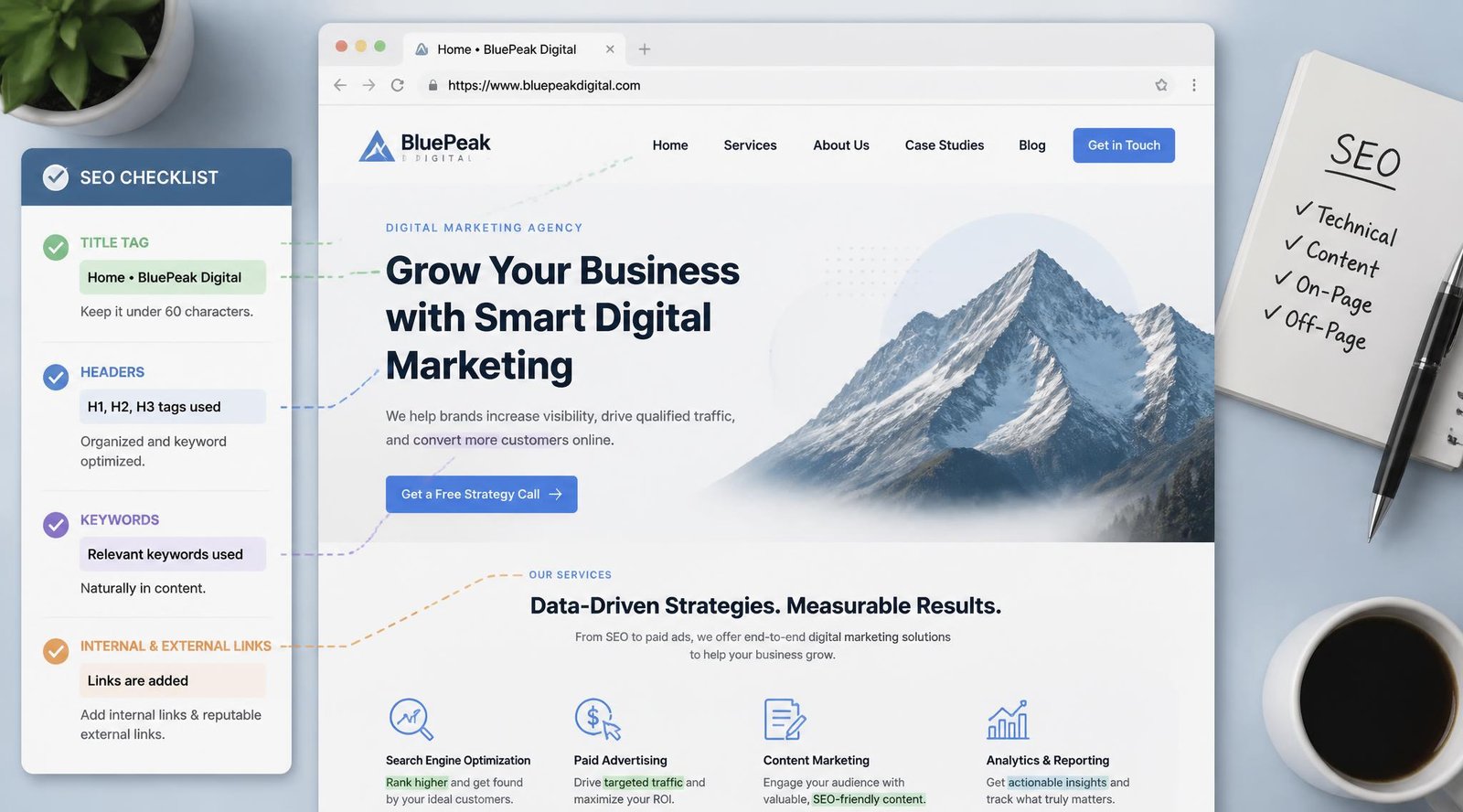
You’ve published a page. The writing is solid, the offer is clear, and you’re genuinely proud of it. Then a month goes by and it’s nowhere on Google — not even on page three. This is one of the most common frustrations business owners run into, and it’s rarely about the quality of the writing. It’s usually about what’s happening (or not happening) inside the page itself: the title tag, the headings, the internal links, the images, the technical scaffolding search engines rely on to understand what a page is actually about.
This is what “on-page SEO” covers — the elements you control directly on a given page, as opposed to off-page factors like backlinks or brand mentions elsewhere on the web. Get on-page SEO right and you give every other part of your strategy — content marketing, landing pages, local visibility — something solid to stand on.
This guide walks through a complete, practical on-page SEO checklist: what to fix, in what order, and why each item matters.
Quick Answer
The best on-page SEO approach depends on what stage your page is at. Brand-new pages need the fundamentals nailed from day one: a keyword-focused title tag, a clear H1, and a logical heading structure. Existing pages that aren’t ranking usually need a content and intent audit first — is the page actually answering what searchers want? — before touching technical details. Pages that rank but don’t convert need on-page SEO paired with stronger calls-to-action and internal linking. In every case, the underlying principle is the same: on-page SEO exists to help search engines and readers understand a page as quickly and clearly as possible.
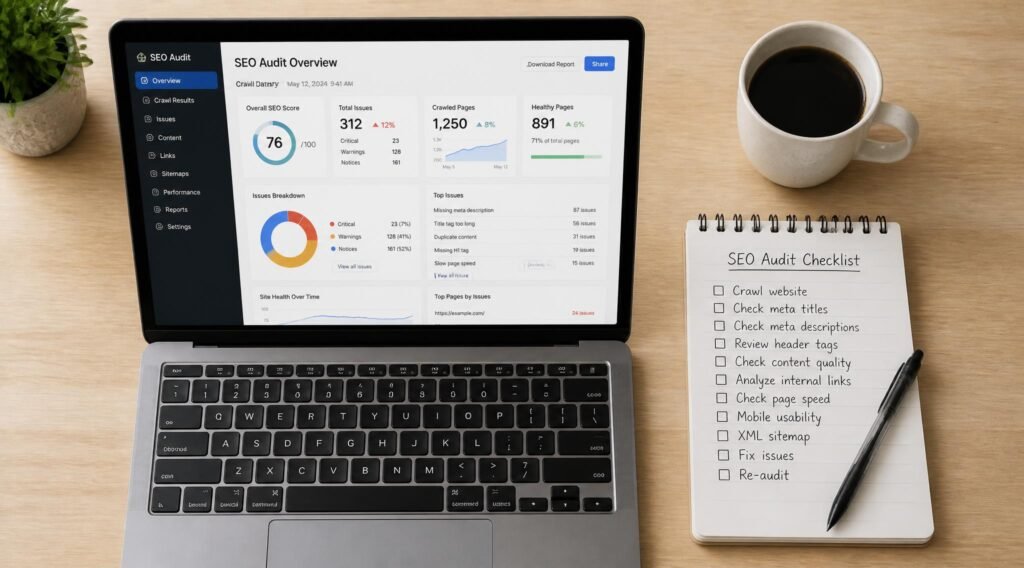
Table of Contents
- What Is On-Page SEO and How Does It Work?
- How to Choose What to Fix First
- The Core On-Page SEO Checklist
- Comparison: On-Page vs. Off-Page vs. Technical SEO
- On-Page SEO for Different Page Types
- How to Apply On-Page SEO Correctly
- Common On-Page SEO Mistakes
- Expert Tips
- Final Thoughts
- FAQ
What Is On-Page SEO and How Does It Work? {#what-is-on-page-seo}
On-page SEO is the practice of optimizing individual web pages — their content, HTML structure, and internal linking — so that search engines can understand and rank them, and so visitors get what they came for. It sits alongside two other pillars: off-page SEO (backlinks, citations, brand signals from other sites) and technical SEO (site speed, crawlability, mobile-friendliness, structured data).
Search engines rely on a mix of signals to decide what a page is about and how well it answers a query: the words in the title tag, the hierarchy of headings, how naturally the target keyword and its variations appear in the body, whether images are described with alt text, and how the page links to other relevant pages on the same site. None of these signals work in isolation — a strong on-page SEO checklist treats them as one connected system, not a list of boxes to check.
This matters because a well-optimized page tends to earn more organic traffic without additional ad spend, which is exactly the kind of compounding return that separates sites that grow steadily from ones that only grow when the ad budget is on. It’s also the layer that makes everything else — from SEO and AEO to local SEO — actually work, since those strategies are built on top of solid page-level fundamentals.
How to Choose What to Fix First {#how-to-choose}
Before working through the full checklist below, ask yourself three questions:
- Is this page indexed at all? If a page isn’t in Google’s index, none of the on-page work matters yet — check indexing status before anything else. Google’s Search Central documentation is the most reliable source for confirming what’s crawlable and indexable on your site.
- Does the page match search intent? A perfectly optimized page for the wrong intent (e.g., a sales page targeting an informational query) won’t rank, no matter how clean the HTML is.
- Is this a new page or an existing one that’s underperforming? New pages need the checklist applied from scratch; existing pages usually need a smaller, targeted set of fixes rather than a full rewrite.
The Core On-Page SEO Checklist {#core-checklist}
1. Title Tags
Overview: The title tag is the single most important on-page element. It’s the blue link text in search results and one of the strongest relevance signals a page sends. Key Elements:
- Primary keyword placed near the front of the title
- 50–60 characters so it doesn’t get cut off in search results
- One clear, specific promise — not a vague description
- Unique across every page on the site Best For: Every indexed page, without exception. Pros: ✅ Strong ranking signal ✅ Directly affects click-through rate ✅ Easy to test and iterate Cons: ❌ Easy to keyword-stuff by accident ❌ Requires ongoing upkeep as keywords shift Our Verdict: Title tags are the highest-leverage fix on this entire checklist. If you only have time for one item today, start here — and while you’re at it, check whether any pages on the site are competing for the same title, the way the site’s two landing-page posts currently do.
2. Meta Descriptions
Overview: Meta descriptions don’t directly influence rankings, but they heavily influence whether someone clicks your result over a competitor’s. Key Elements:
- 150–160 characters
- Includes the primary keyword naturally
- States a clear benefit or outcome, not just a topic restatement
- Ends with a soft call-to-action where relevant Best For: Any page you want to earn clicks from search, especially competitive queries. Pros: ✅ Improves click-through rate ✅ Sets accurate reader expectations Cons: ❌ Google sometimes rewrites it anyway ❌ Easy to leave blank and forget Our Verdict: Treat this as ad copy for a search result. A specific, benefit-led description consistently outperforms a generic one.
3. Header Structure (H1–H6)
Overview: Headings organize a page for both readers skimming it and search engines parsing it. Key Elements:
- One H1 per page, matching the page’s core topic
- H2s for major sections, H3s for subsections
- Primary keyword in the H1 and at least one H2
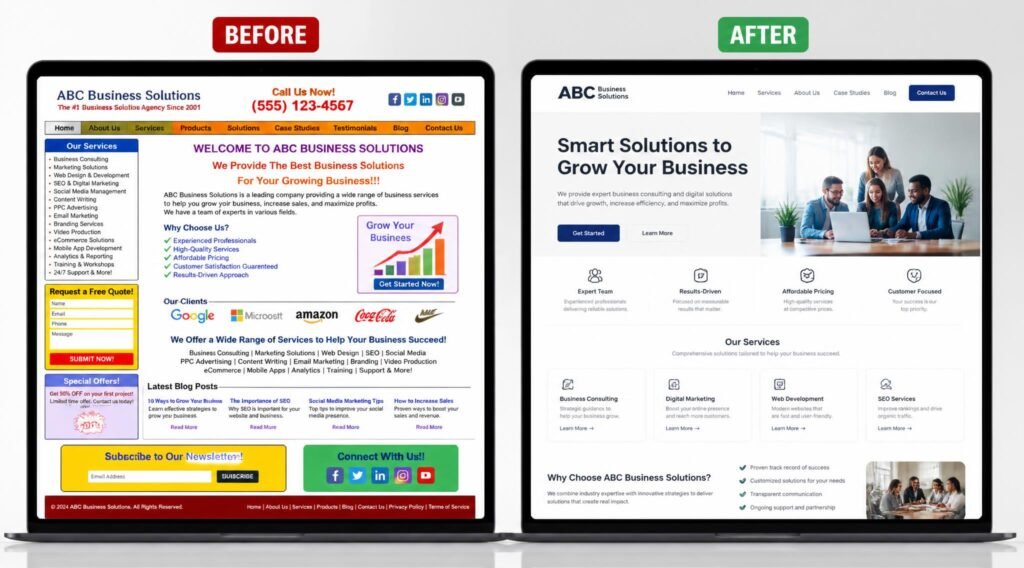
- No skipped levels (don’t jump from H2 to H4) Best For: Long-form content, guides, and any page with multiple sections. Pros: ✅ Improves readability and scannability ✅ Helps earn featured snippets Cons: ❌ Overuse of keyword-matching headings can feel unnatural Our Verdict: A clean heading structure is one of the fastest wins on an existing page — most CMS platforms let you fix this in minutes without touching the body copy. See our content marketing strategy guide for how heading structure supports a broader content plan.
4. Keyword Placement and Density
Overview: Search engines still weigh keyword usage, but modern algorithms reward natural language and topical depth over repetition. Key Elements:
- Primary keyword in the first 100 words
- Natural variations and related terms throughout (not just exact-match repetition)
- Density in the 0.5–2.5% range as a rough guide, never forced Best For: Every page targeting a specific search query. Pros: ✅ Reinforces topical relevance ✅ Works well alongside natural writing Cons: ❌ Over-optimization can trigger spam signals ❌ Hard to balance with genuinely helpful writing Our Verdict: Write for the reader first, then check keyword placement — not the other way around. Pages written keyword-first tend to read stiffly and convert worse, even when they rank.
5. Internal Linking
Overview: Internal links pass authority between pages and help both users and search engines discover related content. Key Elements:
- Link to 3–8 genuinely relevant pages per article
- Use descriptive anchor text, not “click here”
- Link both to and from cornerstone content Best For: Every page on the site, especially newer content that needs authority passed to it. Pros: ✅ Improves crawlability ✅ Keeps visitors on-site longer ✅ Reduces bounce rate Cons: ❌ Easy to overdo and dilute relevance ❌ Broken internal links quietly hurt SEO if not audited Our Verdict: This is the item most sites neglect. A single well-placed internal link from an established page to a new one — for example, linking from the digital marketing mistakes post to a page about fixing them — can meaningfully speed up how fast that new page gets found.
6. Image Optimization
Overview: Images affect both page speed and accessibility, and alt text gives search engines context they can’t get from pixels alone. Key Elements:
- Descriptive file names before upload (not “IMG_2041.jpg”)
- Alt text that describes the image and includes the keyword where natural — never stuffed
- Compressed file sizes for fast load times Best For: Any visual content — this one is easy to skip and easy to fix. Pros: ✅ Supports image search traffic ✅ Improves accessibility ✅ Speeds up page load Cons: ❌ Time-consuming to fix retroactively across a large site Our Verdict: Worth a dedicated pass across older content — a quick site audit often turns up images where the alt text and the actual post topic don’t match, which confuses both readers using screen readers and search engines trying to understand the page.
Comparison: On-Page vs. Off-Page vs. Technical SEO {#comparison-table}
| Factor | Best For | Who Controls It | Typical Time to See Results | Example |
|---|---|---|---|---|
| On-Page SEO | Relevance & clarity | You, directly | Weeks | Title tags, headers, content |
| Off-Page SEO | Authority & trust | Partly external | Months | Backlinks, brand mentions |
| Technical SEO | Crawlability & speed | You, via developer | Days to weeks | Site speed, indexing, schema |
On-Page SEO for Different Page Types {#page-types}
Blog Posts and Guides
Long-form content benefits most from strong heading structure, internal linking, and comprehensive keyword coverage — since these pages are usually competing on depth. Link generously to related guides, such as connecting a foundational SEO post to the SEO vs. AEO piece and the Google tools roundup.
Service and Landing Pages
Service pages need tighter, more commercially-focused title tags and a stronger emphasis on clear calls-to-action alongside the SEO basics. Since landing pages are typically the final step before a lead form, pair on-page SEO with the guidance in our landing pages that convert post rather than treating SEO and conversion as separate projects.
Local Business Pages
Location pages need the standard on-page checklist plus consistent NAP (name, address, phone) details and localized keywords. This overlaps heavily with the fundamentals in our local SEO guide — on-page SEO is the foundation that local SEO is built on top of, not a separate discipline.
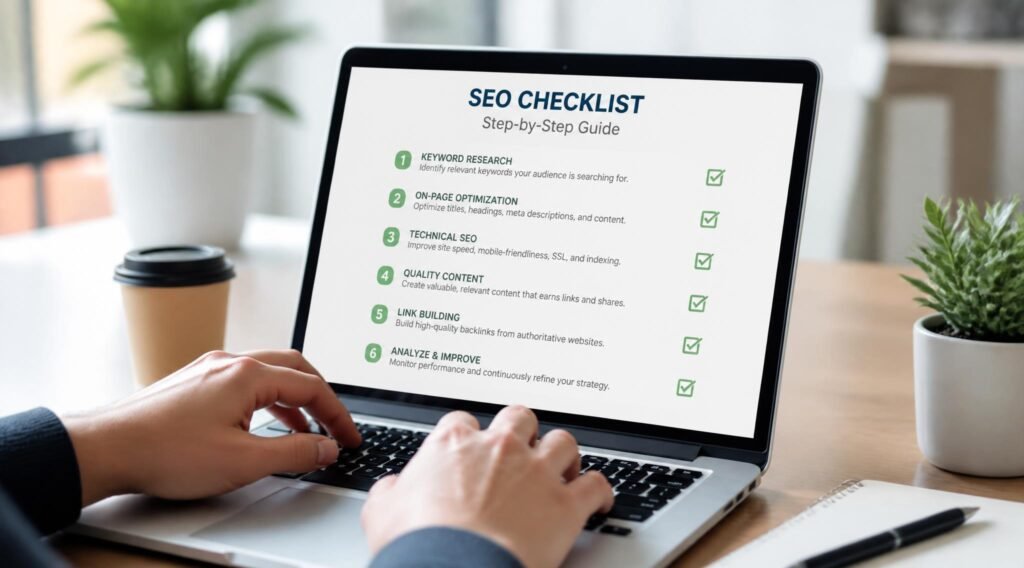
How to Apply On-Page SEO Correctly {#how-to-apply}
For technical specifics on how Google crawls and indexes pages, Google’s official Search Central documentation is the most reliable reference — always verify against the source rather than secondhand summaries, since guidance changes.
Step 1: Audit the Current Page
Pull up the live page and note its current title tag, meta description, heading structure, and word count before changing anything. You need a baseline to measure improvement against.
Step 2: Confirm Keyword and Intent Match
Search the target keyword yourself and look at what’s currently ranking. If the top results are all comparison lists and yours is a single-product page, that’s an intent mismatch no amount of on-page polish will fix.
Step 3: Rewrite Title, Meta, and Headers
Update these three elements together, since they should tell a consistent story about what the page covers.
Step 4: Optimize Body Content and Internal Links
Add keyword variations naturally, tighten paragraphs, and add 3–8 relevant internal links pointing both to and from the page.
Step 5: Review, Publish, and Monitor
Recheck everything against the checklist, publish, and track rankings and click-through rate over the following 4–6 weeks — on-page changes typically take a few weeks to fully register.
Common On-Page SEO Mistakes {#mistakes}
Duplicate or near-duplicate content. Publishing two pages targeting the same keyword and intent splits ranking signals between them instead of concentrating authority in one place — worth checking for across the whole site, not just new posts, before adding more content on related topics.
Keyword stuffing. Repeating the exact-match keyword unnaturally throughout a page reads poorly and can trigger spam-detection systems rather than improving rankings.
Ignoring mobile experience. Since most search traffic is mobile-first, a page that reads cleanly on desktop but breaks or is slow on mobile undermines every other on-page fix — this connects directly to the broader issues covered in our digital marketing mistakes post.
Expert Tips {#expert-tips}
Write the title tag last. Once the full page is written, you’ll have a much clearer sense of the single most compelling angle to lead with — trying to nail it before writing usually results in something generic.
Treat internal linking as a two-way street. Don’t just add links out from a new page; go back and add a link into it from at least one established, high-traffic page so authority flows in both directions.
Re-audit older content quarterly. On-page SEO isn’t a one-time task — search intent shifts, competitors publish, and pages that ranked well a year ago can quietly slide if left untouched.
Final Thoughts {#final-thoughts}
Best overall: a full pass through this checklist — title tag, headers, keyword placement, internal links, and images — applied consistently across a site’s most important pages. Best for a quick win: fixing title tags and internal linking alone, which take the least time and often move the needle fastest. Best for beginners: start with one page, apply the full checklist, and use it as a template before scaling to the rest of the site.
On-page SEO isn’t a one-time checklist you complete and forget — it’s a maintenance habit that compounds. Pair it with the fundamentals in our content marketing strategy guide and local SEO guide for a complete picture of how visibility actually gets built, and see our SEO services if you’d rather have this handled for you.
Frequently Asked Questions {#faq}
Do I need on-page SEO if I’m already running paid ads? Yes. Paid ads drive traffic while the campaign is active; on-page SEO builds traffic that continues after the budget is spent. They work best as complementary channels, not substitutes — see our paid media services for how the two can work together.
How long does on-page SEO take to show results? Most sites see initial movement within 4–8 weeks of applying changes, with fuller results building over 3–6 months as search engines re-crawl and re-evaluate the page.
On-page SEO vs. off-page SEO — which matters more? Neither works well without the other. On-page SEO determines whether a page deserves to rank; off-page SEO (backlinks, mentions) determines how much authority it’s given. Weak on-page fundamentals limit how much off-page effort can achieve.
My page has good content but still isn’t ranking — what’s wrong? Check indexing status first, then search intent match, then technical basics like page speed and mobile usability before assuming the content itself is the problem.
Is keyword density still a real ranking factor? Not in the strict sense it once was. Modern search engines evaluate topical relevance and natural language far more than exact keyword counts — density is a useful sanity check, not a target to hit.
How many internal links should one page have? There’s no universal number, but 3–8 relevant internal links per page is a reasonable working range for most content — quality and relevance matter more than hitting a count.
Do meta descriptions affect rankings directly? Not directly, but they strongly influence click-through rate, which is itself correlated with performance over time.
What’s the single fastest on-page SEO fix I can make today? Auditing and rewriting title tags across your most important pages — it’s the highest-leverage, lowest-effort item on this checklist.
Should every page target a different keyword? Yes, in most cases. Two pages targeting the same keyword and intent compete with each other for the same ranking spot rather than each earning their own.
Does page speed count as on-page SEO? It’s usually classified under technical SEO, but it directly affects how on-page content performs, so the two are worth optimizing together rather than treating as unrelated.
Author: DIGI MONETIZE Team Last Updated: September 2026